
or
Enabling automatic updates for RHEL/CentOS 8
or
How To Configure Automatic Updates On CentOS
In this Tutorial we will cover how to configure automatic updates on CentOS. It is essential that you keep your servers and desktops fully up to date. With the constant threat of attacks to systems, it is only a matter of time before you find your systems down, encrypted or even worse, your data completely lost.
In-case no dnf library
[root@cen7 ~]# yum install dnf
Or
dnf install -y
Now,
Before You Begin
Lets get the dnf package manager up to date, this will ensure the repositories are working correctly. Login to SSH using root and running the following:
dnf update
dnf info dnf-automatic
yum install yum-automatic or dnf install-automatic
[root@cen7 ~]# yum install dnf-automatic

Or
[root@cen7 ~]# dnf install dnf-automatic

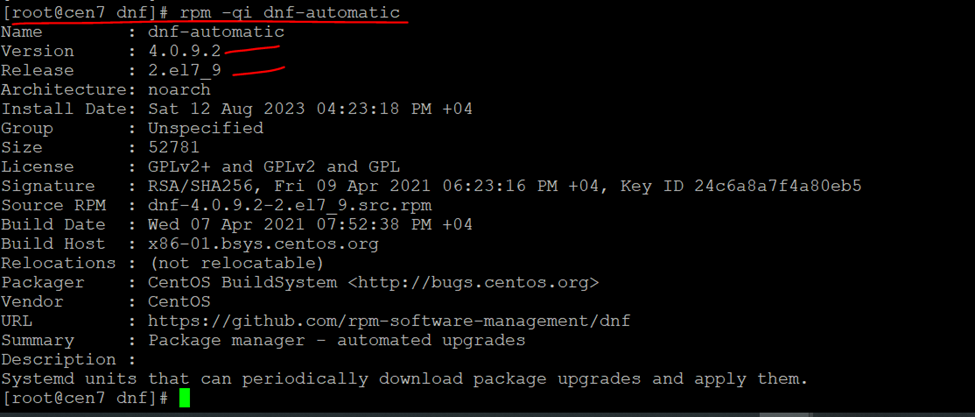
rpm -qi dnf-automatic
[root@cen7 dnf]# rpm -qi dnf-automatic
Cd /etc/dnf/

upgrade_type = default
download_updates = yes
apply_updates = yes
[root@cen7 dnf]# vi automatic.conf

automatic installation of package upgrades, run the ‘dnf-automatic-install‘ timer service
Enable automatic timer
Enable the systemd dnf-automatic.timer timer unit to start using this service
[root@cen7 dnf]# systemctl enable –now dnf-automatic.timer

[root@cen7 dnf]# systemctl list-timers *dnf-*
