
HTTPS+HTTP add multiple Ports
SINGEL DOMAN running in multiple ports
How to SSL multiple ports on same server for single domain name
How do I run two website on same domain with different port on Centos Apache
HTTP & HTTPS same server running in different ports in Centos
Here I am explain how to run http snd https in single domain with 2 ports.
Which port we need to add in Http add in httpd.conf
Default port for https: 443 and for http 80
For HTTP
[root@vre ~]# vi /etc/httpd/conf/httpd.conf
So here I have mentioned 8888 port number.

So, for HTTPS
Need to modify port no or add port number in ssl.conf
For SSL – Changing SSL/TLS https port check in /etc/httpd/conf.d/ssl.conf
[root@vre ~]# vi /etc/httpd/conf.d/ssl.conf
Listen 7575
Listen 443 https
<VirtualHost *:8888>
ServerName querypanel.com
DocumentRoot /var/www/html
ServerAlias own.querypanel.com
ErrorLog /var/www/error.log
CustomLog /var/www/requests.log combined
</VirtualHost>
Added for http
[root@vre ~]# vi /etc/httpd/conf/httpd.conf

For https
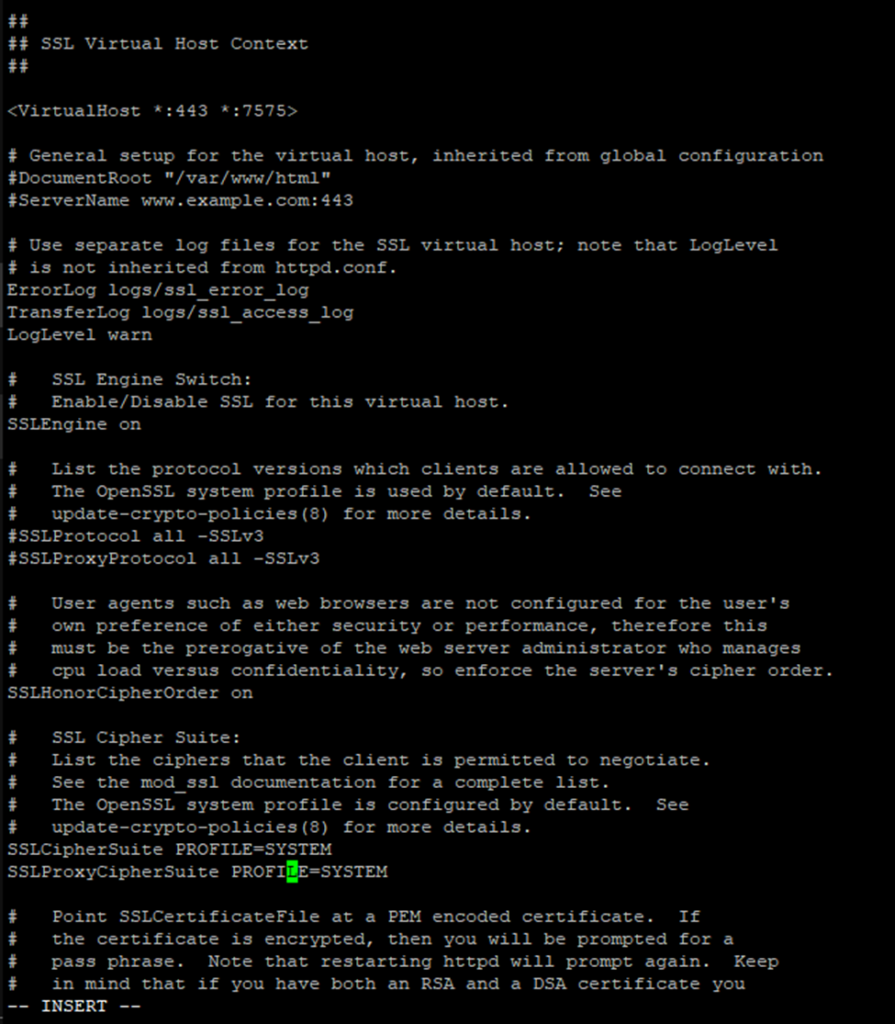
For http
For SSL – Changing SSL/TLS https port check in /etc/httpd/conf.d/ssl.conf
&
SSL Private/public/ ca_bundle link associated with /etc/httpd/conf.d/ssl.conf
[root@vre ~]# vi /etc/httpd/conf/httpd.conf

So if the editing and upgradation process done need to restart httpd service
[root@vre ~]# systemctl restart httpd.service
Or
[root@vre ~]# systemctl restart httpd


Check the address on Browser


I think this is among the most significant info for me. And i am glad reading your article. But want to remark on some general things, The web site style is ideal, the articles is really great : D. Good job, cheers