Linux Commands

File Commands

ls  > Directory Listing

[root@mongodb ~]# ls

Ls –al > Formatted listing with hidden files.

[root@mongodb ~]# ls -al

ls  -lt > Sorting the Listing by time modification

[root@mongodb ~]# ls -tl

Cd >  change the directory

[root@mongodb ~]# cd dir

Cd dir > change directory ( cd Documents)

[root@mongodb ~]# cd Documents

Pwd > Current Working Directory

[root@mongodb ~]# pwd

mkdir dir > suppose here I have mention to create a directory

[root@mongodb ~]# mkdir unix-linux-testing

 Cat  >file >  cat >file.txt

[root@mongodb ~]# cat > querypanel.txt

Hi we are here to show you real time Working Experience

[root@mongodb ~]# cat querypanel.txt  ( it will display the content in the text file)

More file.txt >   ( it will also display the content in the text file)

[root@mongodb ~]# more querypanel.txt

Head filename>

It will only display First 10 lines

[root@mongodb ~]# head query.txt

Tail filename>

It will display last 10 lines of the files

[root@mongodb ~]# tail query.txt

Touch filename > create directory

[root@mongodb ~]# touch querypanel

rm file> Deleting the file

[root@mongodb ~]# rm querypanel.txt

rm -r dir> remove thedirectory

[root@mongodb ~]# rm -r qp

rm -f file> fource to remove file

[root@mongodb ~]# rm -f query.txt

rm -rf dir > fource to remove directory

[root@mongodb ~]# rm -rf querypanel

Process management

Ps > display the current working process

[root@mongodb ~]# ps

Top > display all running process

[root@mongodb ~]#  top

kill pid> kill process suppose PID is 216

so here kill 216 

[root@mongodb ~]# kill 216

killall proc> kill all the process name

[root@mongodb ~]# killall deferwq

File permission

Chmod> file permission

Chmod 775 filename

Chmod 777 filename

Change the permission of file to octal,which can be found separately for user,group,world by adding,

• 4-read(r)

• 2-write(w)

• 1-execute(x)

Chmod  –r

Chmod  –w

Chmod  -x

                                                                                System Info

Date> Show the current date and time

Cal> Show this month’s calendar

w>  Display who is on line

whoami > Who you are logged in as

[root@mongodb ~]# whoami

uname –a>  Show kernel information

[root@mongodb ~]# uname -a

cat /proc/cpuinfo>  Cpu information

[root@mongodb ~]# cat /proc/cpuinfo

df > Show the disk usage

[root@mongodb ~]# df

du > Show directory space usage

[root@mongodb ~]# du

Free> Show memory and swap usage

[root@mongodb ~]# free

Whereis>  Show possible locations

Which>  Show which applications will be run by default

                                                                                Network

Ifconfig > internet protocol details

[root@mongodb ~]# ifconfig -a

mongodb ~]# ifconfig

Ping>   ping host Ping host

[root@mongodb ~]# ping google.com

dig domain>  Get DNS information for domain

[root@mongodb ~]# dig domain

wget file>  Download file

[root@mongodb ~]# wget https://xampp.com

wget -c file Continue a stopped download

 [root@mongodb ~]# wget -c file Continue a stopped download

IMPORTANT COMMANDS

ps –eaf | grep processed id>

[root@mongodb ~]# ps -eaf | grep 221

ps –eaf>

[root@mongodb ~]# ps -eaf

ls –l > list files format

[root@mongodb ~]# ls -l

Ls –rtl > list directory long format

ot@mongodb ~]# ls –rtl

Start with vi <filename>

[root@mongodb ~]# vi /etc/hosts

Edit modes: These keys enter editing modes and type in the text of your document.

i —Insert before current cursor position

I —Insert at beginning of current line

a —Insert (append) after current cursor position

A —Append to end of line

r —Replace 1 character

R —Replace mode

<ESC> —Terminate insertion or overwrite mode

Deletion of text

x —Delete single character

dd —Delete current line and put in buffer

ndd —Delete n lines (n is a number) and put them in buffer

J —Attaches the next line to the end of the current line (deletes carriage return).

su username>

[root@mongodb ~]# su oracle

grep> – Search files for text patterns

awk> – Pattern-matching language

[root@mongodb ~]# awk

ps –ef | grep smon> List available instances on a server

[root@mongodb ~]# ps -ef | grep smon

ps -ef | grep listener | grep -v grep> List available listeners on a server:

[root@mongodb ~]# ps -ef | grep listener | grep -v grep

Reboot > restart system.

[ root@mongodb ~]# reboot

ip route > Check gateway information

[ root@mongodb ~]# ip route

l -a > list all file including hidden

[ root@mongodb ~]# l -a

including . is hidden files

Grep > Used to search the Specific file

  • chown : Used to change the owner of file.
  • chmod : Used to modify the access/permission of a user.

History >

[ root@mongodb ~]# history

User Privilege Management Mysql/Mysqli/Maria DB

MYSQL/MARIA DB /MYSQLI USERS Privileges

STEP 1:

Go to your server directory

Open Prompt command

(Example my xampp server in D Drive)

Login to your Root Directory

D:\xampp\mysql\bin> mysql -h localhost -u root

After login you will be here

MySQL [(none)]>

Step 2:

We need to know how many Users

MySQL [(none)]> SELECT user From mysql.user;

MySQL [(none)]> SELECT host,user From mysql.user;

Host/Users

Step 3:

CREATE A USER

MySQL [(none)]>  CREATE USER ‘querypanel’@’localhost’ IDENTIFIED BY ‘querypane’;


FLUSH PRIVILEGES;  

For changes to take effect immediately flush the privileges

MySQL [(none)]>  GRANT ALL PRIVILEGES ON *.* TO querypanel@’localhost’ IDENTIFIED BY ‘querypanel’;

Here I have given to querypanel user all access.

Now move to root directory and login again via querypanel  new added user
Here login with new added user.

we can Insert, update and delete any user and database

Now I have deleted one database because w have all privileges

Step 4:  now I am going to create one user with limited access permission.

Ctrl+c move to directory. So need to login via root.

Root Directory

After that, creating a new user:

MySQL [(none)]> CREATE USER ‘Arick’@’localhost’ IDENTIFIED BY ‘arick’;

MySQL [(none)]> GRANT CREATE, SELECT,INSERT,UPDATE,DELETE ON delhi_metro.* TO Arick@’localhost’;

This user can access only one database delhi_metro.

Ctrl+c move to Arick (user)

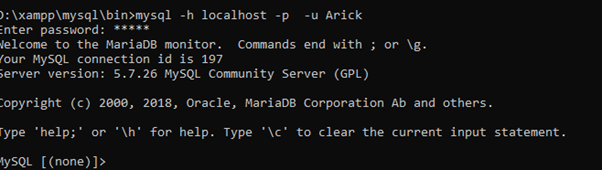
Here We are Login With Arick(user)

D:\xampp\mysql\bin>mysql -h localhost -p  -u Arick

Password : arick

Table Architecture

Permissions : CREATE,  SELECT, INSERT, UPDATE, DELETE

Here:  I have created a Table

MYSQL[ delhi_metro ]> CREATE TABLE North_metro(Metro_id INT NOT NULL PRIMaRY KEY, DESTINATION VARCHAR(50),STOPS VARCHAR(20),STATUS VARCHAR(20));

INSERT

MYSQL[ delhi_metro ] > INSERT INTO North_metro Values(’01’,’MANDI HOUSE’,’05’,’ACTIVE’);

SELECT

MYSQL[ delhi_metro ] > SELECT * FROM North_metro Order by Metro_id ASC;

UPDATE:

MYSQL[ delhi_metro ] > UPDATE north_metro SET DESTINATION=’RJ’ WHERE Metro_id=’1′;

Update Query

DELETE QUERY:

MYSQL[ delhi_metro ] > DELETE FROM north_metro WHERE Metro_id=’22’;

Guys if you have any queries We love to share our Real Time Experience

MARIA DB Xampp Server

How to use mariadb command line in XAMPP Server

Step 1:

Move to your Xampp server Drive via CMD

Example i have install my xampp server in D Directory

so you have to promote the CMD according to your Directory

C:\Users\Arick> cd /d d:\xampp ( you will select according to your drive)

d:\xampp>cd mysql

d:\xampp\mysql>cd bin

D:\xampp\mysql\bin> mysql -h localhost -u root

D:\xampp\mysql\bin> mysql -u root -h 127.0.0.1

(-h) used for localhost

(-u) used for root

After Promote these commands you will get MariaDB [(none)]>

in the quotation you found the [(none)] right now here we don’t select any database if we will select any database it will reflect.

Step 2:

SHOW DATABASES : – Display all database from directory

Example Like this .

Still we don’t select any Particular Database .Show Databases use to display all Database into the Directory.

STEP 3:

USE DATABASE: Now we are here selection Particular Database via USE CMD ,

USE CMD Also used to switch to next database.

suppose here now we are using Arick Database

you only need to type USE Ind , you will move to Ind database.

EXAMPLE : USE I_LOVE_MY_COUNTRY; (I LOVE MY COUNTRY IS A DATABASE )

SELECTED Particular Database

STEP 4:

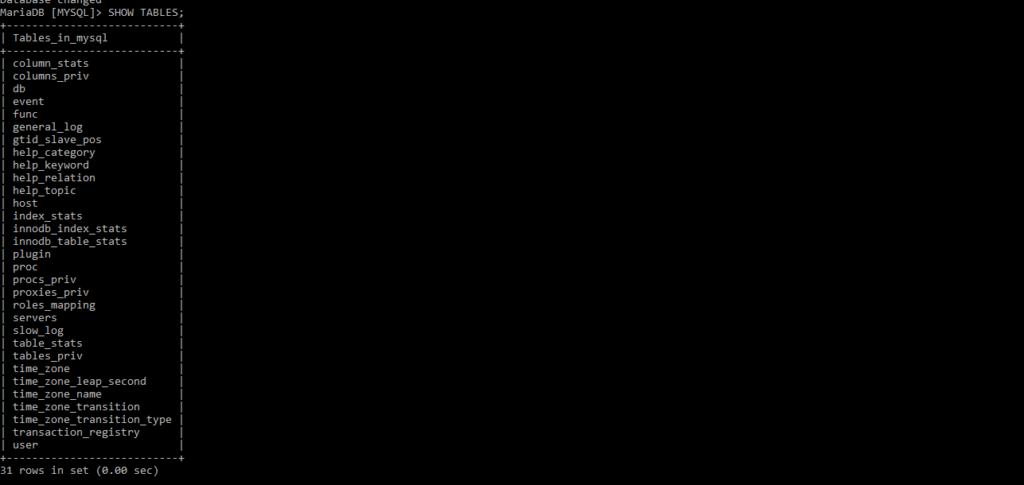
SHOW tables : – it will show all the tables , how many tables in database.

STEP 5:

SELECT Particular table you can INSERT, UPDATE ,ALTER, Via CMD

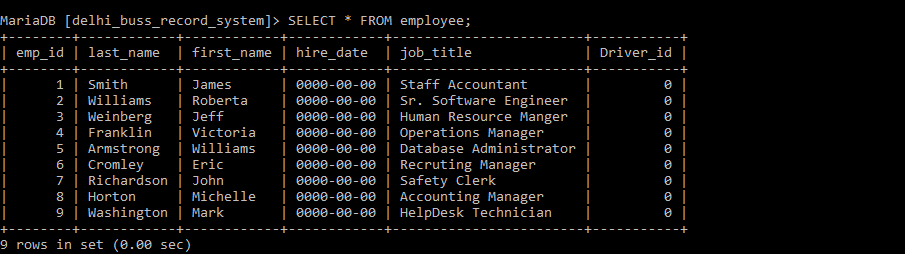
Here i have selected Particular Table

Just make a siple cmd – MariaDB [delhi_buss_record_system]> SELECT * FROM employee;

we can also fetch according to the need,

MariaDB [delhi_buss_record_system]> SELECT emp_id,first_name ,hire_date FROM employee WHERE Driver_id=1;

MariaDB [delhi_buss_record_system]> SELECT emp_id,first_name ,hire_date FROM employee WHERE Driver_id=1;

here Fetch data according to id.


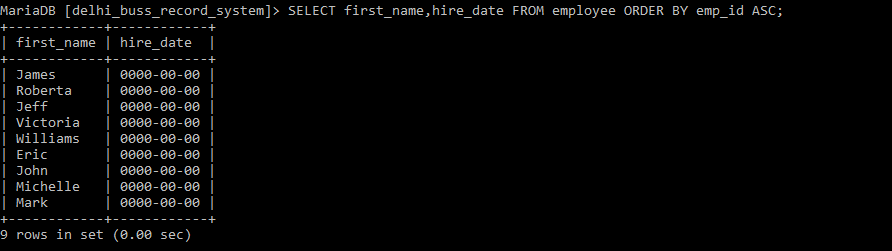
MariaDB [delhi_buss_record_system]> SELECT first_name,hire_date FROM employee ORDER BY emp_id ASC;

Here Fetch Data via ASC (ascending order)

MariaDB [delhi_buss_record_system]> SELECT first_name FROM employee ORDER BY first_name DESC;

Here Fetch Data via DESC(Descending order)

CREATE DATABASE USING CMD

MariaDB [(none)]> CREATE DATABASE Query_Panel;

CREATE TABLES CMD

USE Query_Panel

MariaDB [Query_Panel]> CREATE TABLE Q_Emp_Details (queryp_id INT NOT NULL PRIMARY KEY,Q_NAME CHAR(25),Q_ADDRESS VARCHAR(50));

CREATED TABLE

ALTER TABLE ( Single Column ADD)

MariaDB [Query_Panel]> ALTER TABLE q_emp_details ADD COLUMN Status VARCHAR(30);

ALTER TABLE (Multiple Column ADD in Single CMD)

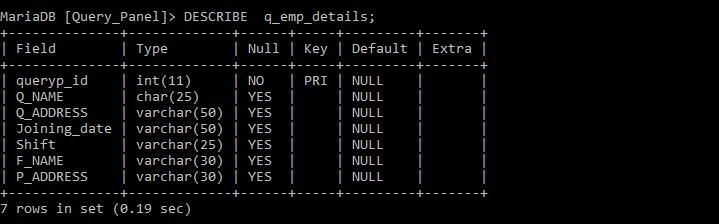
MariaDB [Query_Panel]> ALTER TABLE Q_Emp_Details ADD COLUMN Joining_date VARCHAR(50),ADD COLUMN Shift VARCHAR(25),ADD COLUMN F_NAME VARCHAR(30),ADD COLUMN P_ADDRESS VARCHAR(30);

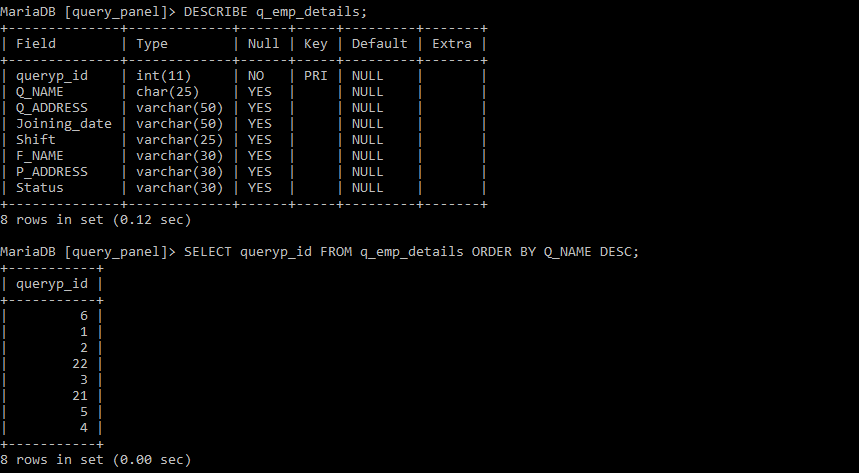
Describe

MariaDB [Query_Panel]> DESCRIBE q_emp_details;

Describe Table

INSERT QUERY

MariaDB [Query_Panel]> INSERT INTO q_emp_details (queryp_id,Q_NAME,Q_ADDRESS,Joining_date,Shift,F_NAME,P_ADDRESS,Status) VALUES (“001″,”QUERYPANEL”,”DELHI”,”12-14-1991″,”NIGHT”,”S”,”PAN”,”SINGLE”);

MariaDB [Query_Panel]> INSERT INTO q_emp_details VALUES (“002″,”QUERY PANEL”,”DELHI India”,”1-14-1991″,”Day”,”S”,”PANjab”,”Married”);

INSERT QUERY

MULTIPLE INSERT IN SINGLE QUERY

MariaDB [Query_Panel]> INSERT INTO q_emp_details VALUES (“003″,”PANEL”,”India”,”1-14-1997″,”Day”,”Sha”,”der”,”Single”),(“004″,”ANEL”,”LHI Indi”,”1-14-1891″,”Both”,”SD”,”PAN”,”Married”),(“005″,”NEL”,”DELHI Ind”,”1-14-1791″,”Day”,”SP”,”PANjab”,”SINGLE”),(“0022″,”QJJUERY OOPANEL”,”U U DELHI India”,”5-14-1997″,”Day”,”S”,”jab”,”Married”),(“006″,”Y PANEL”,”DEL In”,”1-5-1991″,”Day”,”SO”,”Njab”,”Married”),(“0082″,”NELP”,”PDELHI India”,”1-14-1891″,”NIGHT”,”SH”,”ab”,”Married”);

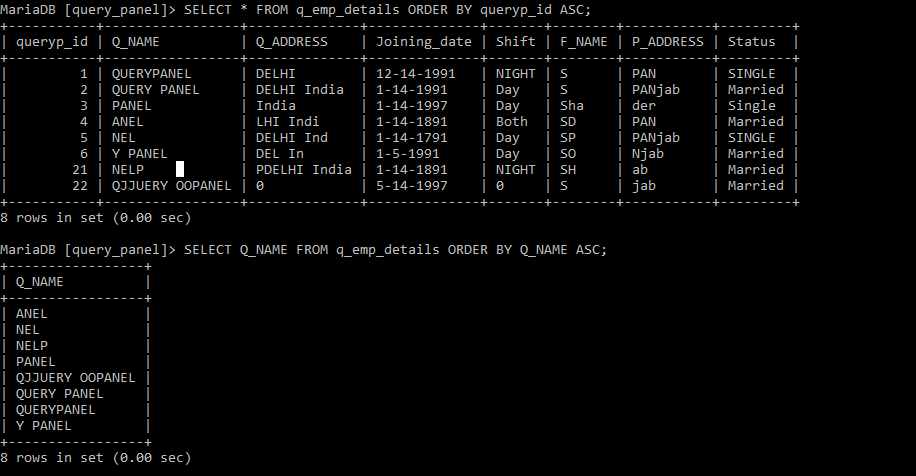
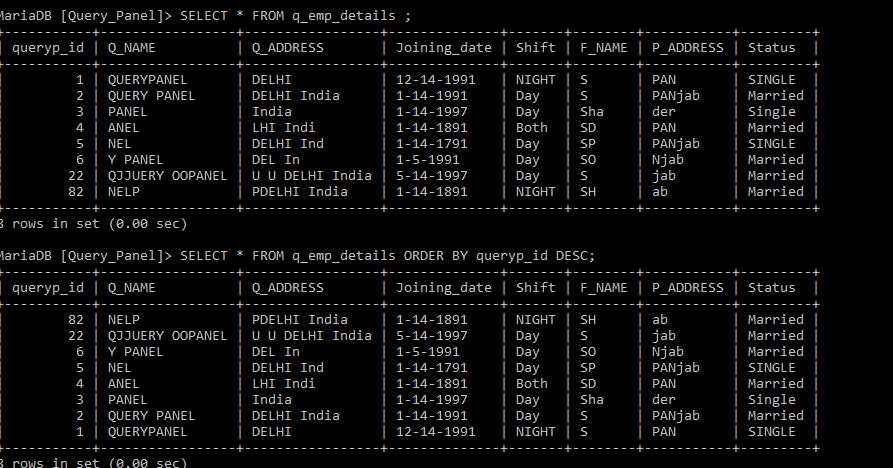
SELECT QUERY USING ASC / DESC

MariaDB [Query_Panel]> SELECT Q_NAME FROM q_emp_details ORDER BY Q_NAME ASC;

MariaDB [Query_Panel]> SELECT * FROM q_emp_details ORDER BY queryp_id DESC;
MariaDB [Query_Panel]> SELECT queryp_id FROM q_emp_details ORDER BY Q_NAME DESC;

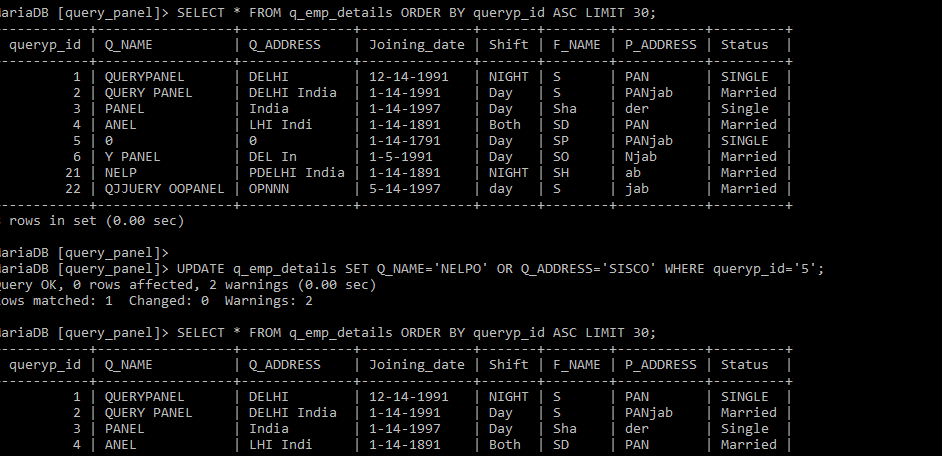
UPDATE QUERY / AND /OR

MariaDB [Query_Panel]> UPDATE q_emp_details SET queryp_id=”21″ WHERE Q_NAME=”NELP”;

MariaDB [Query_Panel]> UPDATE q_emp_details SET Q_ADDRESS=”LAX DEL” AND Joining_date=”12-6-2019″ WHERE queryp_id=”22″;

CHANGE COLUMN NAME

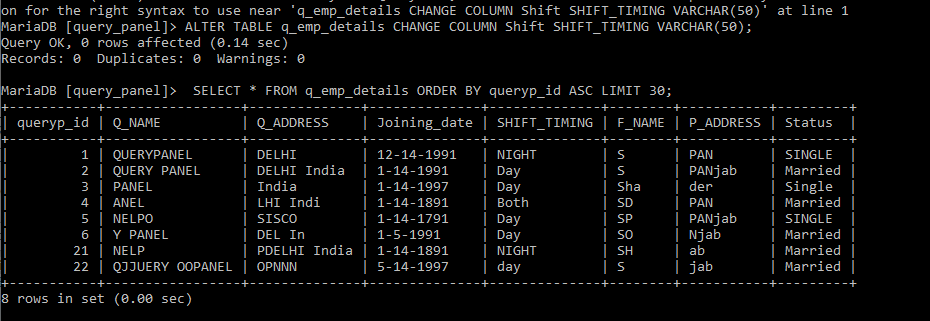
MariaDB [query_panel]> ALTER TABLE q_emp_details CHANGE COLUMN Shift SHIFT_TIMING VARCHAR(50);

OOPS PHP delete.php

<?php 
 require_once('include/config.php');
 $db = new Database();
 //delete about page multiple 
if(isset($_GET['type']) && $_GET['type'] == "multiple_delete_aboutus")
{
  $ids = $_POST['id']; foreach ($ids as $id) 
 {     
   $del_query = "DELETE FROM queryabout WHERE a_id = '$id'";     
   $db->execute($del_query); 
  } 
   return 0;
 }

//delete about page single
 if(isset($_GET['type']) && $_GET['type'] == 'singledelete_aboutus')
 {
    $id = $_GET['id'];
    $query = "DELETE FROM queryabout WHERE a_id = '$id'"; 
    if($db->execute($query))     
    return 0; 
      else     
    return 1;
 }

//delete Services page multiple
if(isset($_GET['type']) && $_GET['type'] == "delete_car_details")
{
  $ids = $_POST['id']; foreach ($ids as $id)
  {     
   $del_query = "DELETE FROM our_car WHERE car_id = '$id'";    
   $db->execute($del_query); 
  } 
  return 0;   
 }
 //delete page single
 if(isset($_GET['type']) && $_GET['type'] == 'singal_delete_car_d')
{
  $id = $_GET['id']; 
  $query = "DELETE FROM our_car WHERE car_id = '$id'"; 
  if($db->execute($query))     
return 0; 
else     
return 1;
 }


?>

PHP oops insert.php

how do we insert data in PHP via OOPS Concepts

<?php
 require_once("../inc/config.php");// .. used for this folder is in root directory
 include_once("all_function.php");  // here insert functions running 
 class InsertData {
private $id; 
private $db;

 function __construct() 
{    
 $this->db = new Database();  
 $this->fun = new AllFunction(); 

}

public function insertTestUs(){

if(isset($_POST['atitle'])){
             $atitle = $_POST['atitle'];
         }else{
             $atitle = "";
         }
if(isset($_POST['aheading'])){
             $aheading = $_POST['aheading'];
     }else{         $aheading = "";     
}

if(isset($_POST['id'])){
             $about_id = $_POST['id'];
         }

if(isset($about_id) && $about_id > 0){
             if($atitle != "" && $aheading != ""){
                 //update query
                 $query = "UPDATE querypanel_about_us SET atitle='$atitle', aheading='$aheading' WHERE about_id ='$about_id'";
                 $this->db->execute($query);
                     echo 0;
             }else{
                 echo 1;
             }

}else{
             if($atitle != "" && $aheading != ""){ 
                 // insert query
                 $query = "INSERT INTO querypanel_about_us(atitle, aheading) VALUES('$atitle','$aheading')";
                 $this->db->execute($query);
                     echo 0;
         }else{             echo 1;         
    }     
   } 
  }
 }
?>


Here i also mention the all function what i have used to included 


<?php 
 class AllFunction
 {

private $data; 
public function escape($data)
{     
$this->data = $data;   
//  mysqli_real_escape_string() function escapes special characters in a string   
//rtrim - remove character from right side of string
$value = mysqli_real_escape_string(rtrim($data));     return $value; 
 }
}
?>

Fetch values in OOPS PHP

Fetch_values.php i have create a fetching value page so here i have to include config.php for connection page must be in that folder so we can fetch data from database.

Suppose if we stored config.php file so we need to add config page for receiving data

require(“include/ config.php “); also can use require_once(“include/ config.php “);

(Difference between Include ,Include_once & require ,require_once)

include – include or include_once produce E- Warning and scripts will continue ,

require or require_once – Produce a fatal error E – Compile Error and stop the scripts

<?php 
 require_once('include/config.php');
 class FetchValues
 {

private $id; 
private $db; 
private $setLimit; 
private $pageLimit; 
private $banner_id;

 function __construct() {    

 $this->db = new Database(); }

public function getAboutUsById($id)
 {    
 $this->id = $id;     
$query = "SELECT * FROM testabout WHERE about_id = '$id' AND status=0 LIMIT 1";    
 $exe_query = $this->db->execute($query);     
$result = $this->db->getResult($exe_query);    
 return $result; 
}

public function getAboutUsData()
 {    
 $query = "SELECT * FROM testabout";     
$exe_query = $this->db->execute($query);    
 $results = $this->db->getResults($exe_query);    
 return $results; 
}

public function getWhatsIncludes()
 {     
$query = "SELECT * FROM includes WHERE status=0 ORDER BY include_id DESC";     $exe_query = $this->db->execute($query);    
 $results = $this->db->getResults($exe_query);    
 return $results; 
  }
 }
 ?>

PHP Config.php file Using OOPS

Here i have Write Oops Config file in Core PHP 

<?PHP 
  session_start();
  class Database 
{
      private $folder_name;
      private $host_name;
      private $user_name;
      private $password;
      private $db_name;
      private $con;
      private $result;
      function __construct()
      {
if($_SERVER['HTTP_HOST'] == 'localhost'){  //(if we will use it in local server xampp)
              $this->folder_name = '/test/';
              $this->host_name = "127.0.0.1";
              $this->user_name = "root";
              $this->password = "";
              $this->db_name = "test";
          }else{
              $this->folder_name = "/test";  //(if we will use it in Hosting server)
              $this->host_name = "127.0.0.1";
              $this->user_name = "sharique";
              $this->password = "sharique";
              $this->db_name ="test";
          }
$this->con = mysql_connect($this->host_name, $this->user_name, $this->password)
          or die("Couldn't connect to the database".mysql_error());
          mysql_select_db($this->db_name,$this->con);

}
public function execute($query){
          $this->result = mysql_query($query, $this->con);
      }
public function getResult(){
          return mysql_fetch_assoc($this->result);
      }
public function getResults(){      $return = array();      while ($row = mysql_fetch_assoc($this->result)) {          $return[]=$row;      }      return $return;  }  public function rowCount(){      return mysql_num_rows($this->result);  }  public function LastId() {     return mysql_insert_id(); }  public function affectedRows(){      return mysql_affected_rows();  }
 } 

if($_SERVER["HTTP_HOST"]=="192.168.1.194:8081"){
     $folder_name='/Testing/';
 } else {
     $folder_name='/';
 }
 $root = 'http//'.$_SERVER['HTTP_HOST'].$folder_name;
 $doc_root =$_SERVER['DOCUMENT_ROOT'].$folder_name;
 $css_root = $root. 'css/';
 $script_root=$root.'js/';
 $lib_root = $root.'lib/';
 $include_root = $root.'include/';
 $images_root = $root.'images/';
 date_default_timezone_set('Asia/Calcutta');
 $date=date('Y-m-d H:i:s');
 $modified_date=date('d-M-Y, D');
 $site_title="Testing";
 define("WEB_ROOT",$root);
 define("DOC_ROOT",$doc_root);
 define("CURR_DATE",$date);
 define("MODIFIED_DATE",$modified_date);
 define("CSS_ROOT",$css_root);
 define("LIB_ROOT",$lib_root);
 define("INCLUDE_ROOT",$include_root);
 define("SCRIPT_ROOT",$script_root);
 define("IMAGES_ROOT",$images_root);
 define("SITE_TITLE",$site_title);


?>

PHP Config page using mysqli
CONFIG.PHP 
<?php 

$servername =  'localhost'; $username  =   'root'; $password  =   ''; 

$dbname    =   'databasename';

$connection=mysqli_connect($servername,    $username, $password, "$dbname");
     
if(!$connection)         {           die('Could not Connect MySql Server:' .mysql_error());     } 

/*$mysqli = new mysqli("localhost","root","","databasename");  if ($mysqli->connect_errno) {     printf("Connect failed: %s\n", $mysqli->connect_error);     exit(); } */

 ?>

INDEX.PHP

<h2 class="title">Registration Info</h2>                     

<form method="POST" action="insert.php" name="insertform">                         <div class="input-group">                             
<input class="input--style-1" type="text" placeholder="NAME" name="name" id="name">                         
</div>                         
<div class="input-group">                            
 <h1>Show Checkboxes</h1> <br>                           
  <input type="checkbox" name="vcl[]" value="Bike">                             <label for="vcl"> I have a bike</label><br>                             <input type="checkbox" name="vcl[]" value="Car">                             <label for="vcl"> I have a car</label><br>                             <input type="checkbox" name="vcl[]" value="Boat">                             <label for="vcl"> I have a boat</label><br><br>                         </div>                         
<div class="row row-space">                             
<div class="col-2">                                 
<div class="input-group">                                    
 <input class="input--style-1 js-datepicker" type="text" placeholder="BIRTHDATE" id="birthday" name="birthday">                                     <i class="zmdi zmdi-calendar-note input-icon js-btn-calendar"></i>                                 </div>                            
 </div>                             
<div class="col-2">                                
 <div class="input-group">                                     
<div class="rs-select2 js-select-simple select--no-search">                                         <select name="gender">                                            
 <option disabled="disabled" selected="selected">GENDER</option>                                             <option>S</option>                                             <option>M</option>                                             <option>F</option>                                             <option>O</option>                                        
 </select>                                         
<div class="select-dropdown"></div>                                     </div>                                 
</div>                            
 </div>                             
<div class="col-2">                             <tr>                                 <!-- checked radio button -->                            
 <td align="left">User Gender : </td>                              
   <td>                              
 <input type="radio" name="user_gender" value="Male"> Male                                                                
 <input type="radio" name="user_gender" value="Female"> Female                               <input type="radio" name="user_gender" value="Other"> Other                             </td>                           
  </tr>                            
 </div>                            
 <div class="col-2">                               
  <div class="input-group">                               
   <tr>                                    
 <td>Hobbies</td>              
                       <td>                                            <input type="checkbox" name="hobbies[]" value="cricket"/>Cricket                                        <input type="checkbox" name="hobbies[]" value="football"/>football                                        <input type="checkbox" name="hobbies[]" value="tenis"/>Tenis                                        <input type="checkbox" name="hobbies[]" value="vollyball"/>Vollyball                                    </td>                           
      </tr>                            </div>                        </div>                    </div>               
     <div class="input-group">                
     <div class="rs-select2 js-select-simple select--no-search">                         <select name="class">                             <option disabled="disabled" selected="selected">CLASS</option>                             <option>Class 1</option>            
                 <option>Class 2</option>                             <option>Class 3</option>                
         </select>                         <div class="select-dropdown"></div>                     </div>                 </div>                 <div class="row row-space">                     <div class="col-2">                         <div class="input-group">                             <input class="input--style-1" type="text" placeholder="REGISTRATION CODE" id="res_code" name="res_code">                         </div>                     </div>                 </div>                 <div class="p-t-20">                     <button name="send" id="send" class="btn btn--radius btn--green" type="submit">Submit</button>                 </div>             </form>             <br>             <?php              echo "<table border=1>";             echo "<tr>";             echo "<td>ID</td>";             echo "<td>NAME</td>";             echo "<td>DOB</td>";             echo "<td>Gen</td>";             echo "<td>Cls</td>";             echo "<td>RG No</td>";             echo "<td>Hb</td>";             echo "<td>CHK</td>";             echo "<td>Usr Gen</td>";             echo "<td colspan=2>Act</td>";             echo "</tr>";             echo "</thead>";              if ($regis = $connection-> query("SELECT * FROM registration ORDER BY id ASC")){                 $i =1;                 foreach ($regis as $registration) {                     ?>                     <tbody>                         <tr>                           <th scope="row"><?php echo $i++; ?></th>                           <td><?php echo $registration['name']; ?></td>                           <td><?php echo $registration['birthday']; ?></td>                           <td><?php echo $registration['gender']; ?></td>                           <td><?php echo $registration['class']; ?></td>                           <td><?php echo $registration['res_code']; ?></td>                           <td><?php echo $registration['hobbies']; ?></td>                           <td><?php echo $registration['vcl']; ?></td>                           <td><?php echo $registration['user_gender']; ?></td>                           <td> <a href="edit.php?id=<?php echo $registration['id']; ?>&edit=Y"><i class="fa fa-pencil-square-o" aria-hidden="true"></i></a> </td>                           &nbsp                           <td><a href="delete.php?id=<?php echo $registration['id']; ?>&del=y" onClick="return confirm('Do you really want to delete this ?');"><i class="fa fa-trash-o" aria-hidden="true"></i></a>                           </td>                       </tr>                   <?php } $regis->close(); }                     $connection->close();                    ?>               </tbody>           </table>       </div>   </div> </div> </div> <!-- Jquery JS--> <script src="vendor/jquery/jquery.min.js"></script> <!-- Vendor JS--> <script src="vendor/select2/select2.min.js"></script> <script src="vendor/datepicker/moment.min.js"></script> <script src="vendor/datepicker/daterangepicker.js"></script> <!-- Main JS--> <script src="js/global.js"></script> <script type="text/javascript"> /*$("#send").click(function(e){ var name = $("#name"); var birthday = $("#birthday"); var gender = $("gender"); //var class = $("class"); var res_code = $("res_code"); if(!name.val()){ $("#name").css("border", "1px solid red"); $("#name").focus(); e.preventDefault(); } if(!birthday.val()){ $("#birthday").css("border", "1px solid red"); $("#birthday").focus(); e.preventDefault(); } if(!gender.val()){ $("#gender").css("border", "1px solid red"); $("#gender").focus(); e.preventDefault(); } if(!res_code.val()){ $("#res_code").css("border", "1px solid red"); $("#res_code").focus(); e.preventDefault(); } */ //}); </script> </body><!-- This templates was made by Colorlib (https://colorlib.com) -->
 
INSERT.PHP
include_once 'config.php';
$name =  $_POST['name'];
       $birthday =  $_POST['birthday'];
       $gender =  $_POST['gender'];
       $class = $_POST['class'];
       $res_code =  $_POST['res_code'];
       $a = $_POST['hobbies'];
       $hobbies = implode(",", $a);
       $c = $_POST['vcl'];
       $vcl = implode(",", $c);
       $user_gender = $_POST['user_gender'];

query ("INSERT INTO registration (name,birthday,gender,class,res_code,hobbies,vcl,user_gender) VALUES ('$name','$birthday','$gender','$class','$res_code','$hobbies','$vcl','$user_gender') ");       if($insert)         {         $msg="Inserted";         echo "alert('$msg');
";         header('Location:index.php');         }   }       else       {        $errormsg="Error !!! Coba Lagi !!";        echo "alert('$errormsg');";        header('Location:index.php');       } $connection->close(); ?>
     
EDIT.PHP

include_once 'config.php';
 if(isset($_GET['id']))
   {
     $id=$_GET['id'];
     if(isset($_POST['update']))
     {
     $name=$_POST['name'];
     $birthday=$_POST['birthday'];
     $gender=$_POST['gender'];
     $class=$_POST['class'];
     $res_code=$_POST['res_code'];
 $b = $_POST['hobbies']; $hobbies=implode(",", $b); $d = $_POST['vcl']; $vcl=implode(",", $d); $user_gender = $_POST['user_gender'];

query ("UPDATE registration SET name='$name',vcl='$vcl', birthday='$birthday', gender='$gender', class='$class', res_code='$res_code', hobbies='$hobbies',user_gender='$user_gender' WHERE id='$id'");     //echo $update_query;die;     if($update_query)     {     echo " alert('Rows are updated successfully');
";     echo "window.location='index.php?msg=Sent sucessfully.';
";       $msg="Secessfully Updated";     //echo '';     //header('Location:index.php');     }   }   }   ?>   <?php     if(isset($_GET['id']))     {     $id = $_GET['id'];     $test_query = $connection->query ("SELECT * from registration WHERE id='$id'");     //print_r($test_query);die;     while($data_fetch = $test_query->fetch_array(MYSQLI_BOTH))     {       //print_r($data_fetch);die;       $name = $data_fetch['name'];       //print_r($name);die;       $birthday = $data_fetch['birthday'];       $gender = $data_fetch['gender'];       $class = $data_fetch['class'];       $res_code = $data_fetch['res_code'];       $a = $data_fetch['hobbies'];       $hobbies = explode(",",$a);       $c = $data_fetch['vcl'];       $vcl = explode(",",$c);       $user_gender = $data_fetch['user_gender'];       //print_r($user_gender);die;   ?> <h2>Updating Data</h2> <form action="" method="post" name="insertform">   <table>    <tr>      <td>Name</td>     <td>:</td>     <td><input type="text" name="name" required placeholder="name" value="<?php echo $name;?>"></td>    </tr>    <tr>      <td>DOB</td>     <td>:</td>     <td><input type="text" name="birthday" required placeholder="birthday" value="<?php echo $birthday;?>"></td>    </tr>     <tr>      <td>Gender</td>     <td>:</td>     <td>       <?php $test_gender = array("S","M","F","O" ); ?>       <select name="gender" required>         <?php foreach ($test_gender as $gender_val ) {           $select = "";           if($gender_val == $data_fetch["gender"]){             $select = "selected";           }         }          ?>         <option value="O"                      <?php if ($data_fetch['gender'] == 'O') echo 'selected="selected"'; ?>>O         </option>         <option value="M"                   <?php if ($data_fetch['gender'] == 'M') echo 'selected="selected"'; ?>>M         </option>         <option value="F"                 <?php if ($data_fetch['gender'] == 'F') echo 'selected="selected"'; ?>>F         </option>       </select>     </td>   </tr>   <tr>     <td>Hobbies</td>           <td>                <input type="checkbox" name="hobbies[]" value='cricket' / <?php if (in_array("cricket", $hobbies)){               echo "checked";              }else { echo "";} ?>>Cricket              <input type="checkbox" name="hobbies[]" value='football' / <?php if (in_array("football", $hobbies)){               echo "checked";              }else { echo "";} ?>>football              <input type="checkbox" name="hobbies[]" value='tenis' / <?php if (in_array("tenis", $hobbies)){               echo "checked";              } else { echo ""; } ?>>Tenis              <input type="checkbox" name="hobbies[]" value='vollyball' / <?php if (in_array("vollyball", $hobbies)){               echo "checked";              } else { echo ""; } ?>>Vollyball           </td>      </tr>     <tr>     <td>Vechile</td>           <td>                <input type="checkbox" name="vcl[]" value='bike' / <?php if (in_array("bike", $vcl)){               echo "checked";              } ?>>Bike              <input type="checkbox" name="vcl[]" value='car' / <?php if (in_array("car", $vcl)){               echo "checked";              } ?>>Car              <input type="checkbox" name="vcl[]" value='boat' / <?php if (in_array("boat", $vcl)){               echo "checked";              } ?>>Boat           </td>      </tr>     <!-- checked radio button -->     <tr>         <td align="left"> Usr Gender : </td>           <td>             <?php             $radio1 = "";             $radio2 = "";             $radio3 = "";             if($data_fetch["user_gender"] == "Male"){             $radio1 = "checked";             }elseif($data_fetch["user_gender"] == "Female"){             $radio2 = "checked";             }elseif ($data_fetch["user_gender"] == "Other") {               $radio3 = "checked";             }             ?>           <input type="radio" name="user_gender" value="Male" <?php echo $radio1; ?>/> Male                         <input type="radio" name="user_gender" value="Female" <?php echo $radio2; ?>/> Female           <input type="radio" name="user_gender" value="Other" <?php echo $radio3; ?>/> Other         </td>         </tr>    <tr>      <td>class</td>     <td>:</td>     <td><input type="text" name="class" required placeholder="" value="<?php echo $class;?>"></td>    </tr>    <tr>      <td>class</td>     <td>:</td>     <td><input type="text" name="res_code" required placeholder="" value="<?php echo $res_code;?>"></td>    </tr>   </table>     <input type="submit" name="update" value="Update"/>     <input type="button" name="cancel" value="cancel" onClick="window.location.href='index.php';" />    </p>   </form>   <?php } } ?> 

OOPS

Object-Oriented Programming (PHP OOPS)

OOPs Dependencies

  • Class
  • Object
  • Inheritance
  • Polymorphism
  • Overloading
  • Overriding
  • Abstraction
  • Constructor
  • Destructor

Object oriented programming language is the concept of oops programming language.

CLASS : – Class is a group of Values with a set of Operations we can also say class is a blue-print(Architecture) object . Class can be used to seprate the data from relative data . we can think of a class as a template for making many instances of the same kind of object . ( instances – Objects are also known as instance(background process also know as instance )

Example Class -: a programmer can create a car class which describe a car. This class can contain the properties of a car (color, model, year, etc.)

<?php 
 class FetchDataTest { 
     private $db; 
     private $id; 
 function __construct() 
 db = new Database();(Object)     }    
 public function FunctionnameTest(){        
 $test = $this->db->execute("SELECT * from testabc(tablename)");        
 $results = $this->db->getResults($test);         
return $results;   
  } 
} 
?>


Object: – Object is a Class types variable it is the components of oops , the new operator used to create an Object.

Example : $object = new database(); $this -> db = new Database();

Inheritance : Drive a new class from an old class called as Inheritance ,we can create a new class with the help of old class known as Inheritance (Extends keywords used to inherit the class) , Inheritance specially used for reduce the number of code.

 Example : - son can used Father Properties so same as in Inheritance .
 SYNTAX
 Class Father {
         member of class father
 }
 Class son extends Father{
 member of class son
 }
   

Polymorphism : One things has many Form knows as Polymrphism ,(many types , many form)

Example : -   Just make a call to toll free number ,  During the call they give us a suggestion English for click 1 , Hindi for click 2 and so on 

Overloading :- Two or more function having same but the argument will be different

Example : real time Example assign some extra tasks to someone known as Overloading , same name but differ in the type of input parameter .

functions that have similar signatures .   only overload methods using the magic method __call. 
Class Test {
public FunctionTestA1(hi){
     echo "hi";
 }
}
 Class TestB1 {
public FunctionTestA1(Hello){
     echo "Hello";
 }
} 

Overriding : – Overriding is to replace parent method in child class ,Two method with same name and same parameter known as Overriding.

 public class Forestanimal {
      public function readytoSpeak() {
          echo "Cat Speaking";
      }

   // This is overloading the method  readytoSpeak .
      public function readytoSpeak($sound) {
        echo  $sound;
      }
    } 

Abstraction : Require things will be Display Other used to hide .

Example: we have a Complete Employees Database Table , Name ,Address ,Department ,and so on .i just only need to fetch employees name and department.

Sql> SELECT name, department FROM Employees. so here we have get only require things other things we don't need .

Constructor : constructor is the member function of class that automatically called when an object created to other class.

Example : __construct ( ) : –

suppose page1.php 

class FetchData
{
private $db;
private $id;
function __construct()
{
$this->db = new Database();
}
Page2.php

$obj = new FetchData();